![SpacetoCo_Logo2_black.png]](https://support.spacetoco.com/hs-fs/hubfs/SpacetoCo_Logo2_black.png?height=50&name=SpacetoCo_Logo2_black.png)
This article is for Hosts who need to add entry details or transit information to a Space listing.
Setting Access and Transport Information
You can add entry instructions and transport details across two distinct areas in your Space settings:
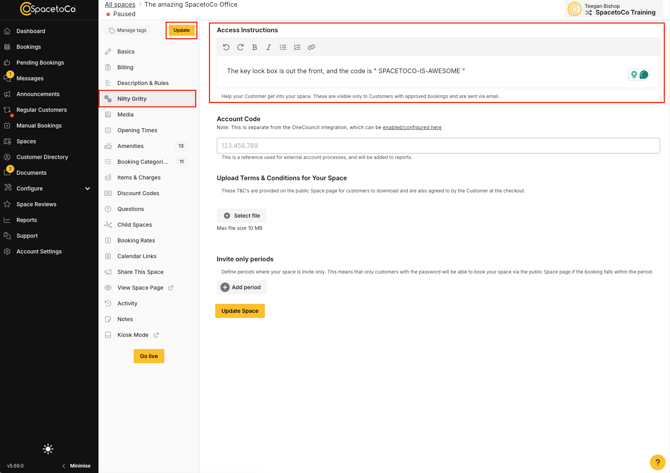
Access Instructions
Access instructions provide specific details on how to enter a Space, such as key codes, lockbox locations, or contact procedures upon arrival.
- Visibility: Included in booking confirmation emails sent to the Customer only after a booking is approved.
- Location: Found under the Nitty Gritty tab when editing a Space.
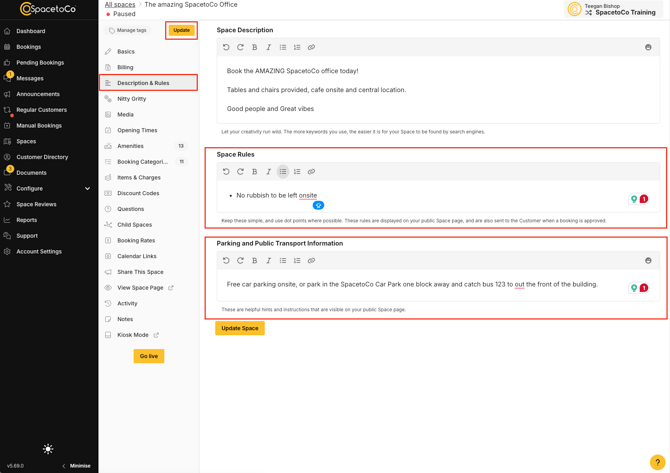
Parking and Public Transport Information
Parking and public transport information details parking availability, disability access, and nearby public transit options.
- Visibility: Publicly displayed on your Space listing page and indexed by search engines. Supports rich text formatting, including bold, italics, bullet points, and numbered lists.
- Location: Found under the Description & Rules tab when editing a Space.