![SpacetoCo_Logo2_black.png]](https://support.spacetoco.com/hs-fs/hubfs/SpacetoCo_Logo2_black.png?height=50&name=SpacetoCo_Logo2_black.png)
This article is for Hosts managing Regular Customers who need manual invoicing instead of automated monthly card payments.
Manual Payments allows Regular Customers to pay monthly invoices manually rather than through automated card charges. Because manual processing involves additional steps and slower reconciliation, SpacetoCo recommends using automated payment workflows whenever possible.
Why Use Manual Payments?
- Customers opting out of automated card charges:
Gives Hirers direct control over monthly invoice payments without storing card details. - Free or internal bookings:
Allows internal staff or free facility users to complete the signup process without inputting payment details.
How to Enable Manual Invoicing
- Go to your Account Preferences
- Toggle Regular Manual Payments on.
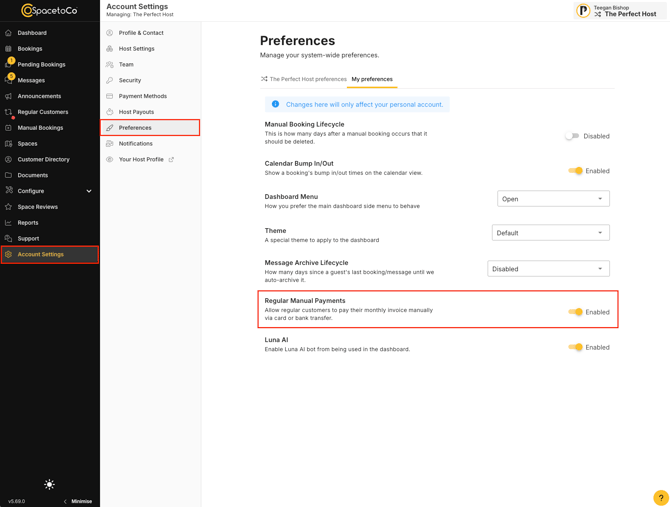
Inviting New Customers to Manual Payments
Generate unique signup links in your Regular Customer Management dashboard.
- Locate the application form link options.
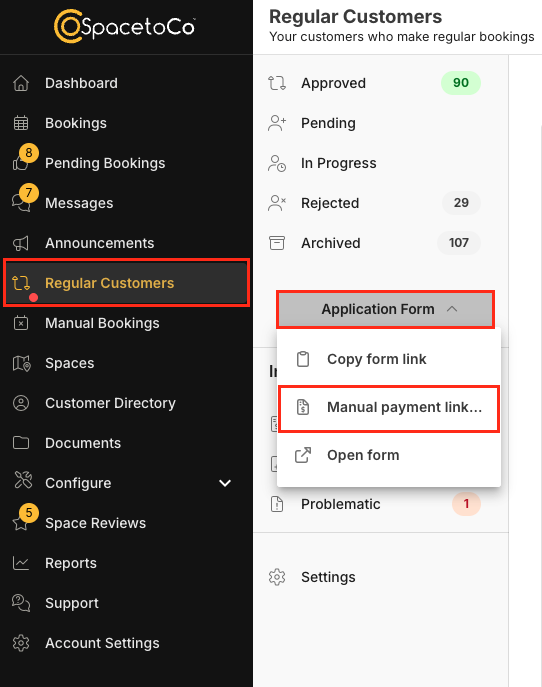
- Select and copy either the Manual Card Payment or Manual Bank Transfer link.
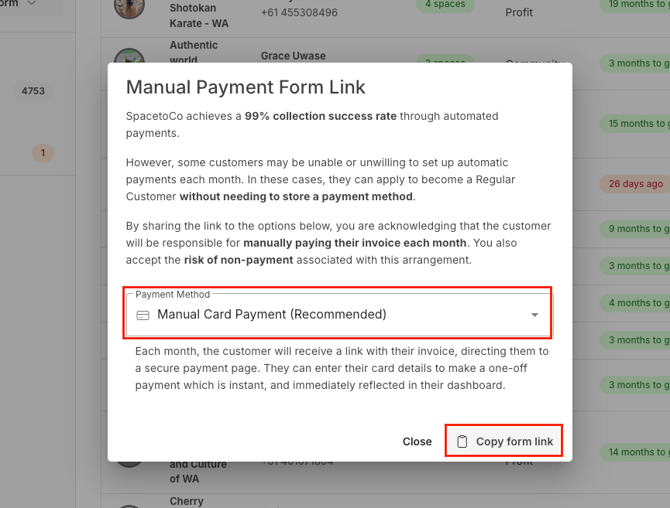
- Share the unique link with the specific customer.
Note: Manual payment links should only be shared with specific Hirers requiring this option. Manual Card Payment is the recommended method for security and reliability. Once a Hirer submits their application via this link, review and approve it using your standard workflow.
Converting an Existing Customer to Manual Payments
To convert an existing Regular Customer from automated to manual payments:
- Go to Regular Customer Management
- Open the Actions menu on the customer's application and select Payment method.
- Choose either Manual Card Payment or Manual Bank Transfer and confirm.
🎥
Note: Converting a customer to manual payments cannot be undone by a Host. Only the Customer can opt back into automatic payments from their account.
Frequently Asked Questions
-
Will payouts still arrive on schedule?
Payouts depend on when the Customer completes their payment. Because manual invoices fall outside automated debit retries, funds may arrive in a subsequent payout cycle. -
How does invoice reconciliation work?
SpacetoCo manages invoice reconciliation automatically once payment is received. -
Are Hirers notified of unpaid invoices?
Invoices issue on the 7th of the month. Reminders send every 7 days until paid, and a payment prompt displays at the top of the Hirer's dashboard. -
How do Hosts monitor unpaid invoices?
View unpaid invoices in the Invoices section of Regular Customer Management. -
Can Hirers forward invoices to finance departments?
Yes. Payment links can be shared and paid without requiring a login. -
Can a Customer switch themselves from automatic to manual payments?
No. Only Hosts can convert a Customer to manual payments.