![SpacetoCo_Logo2_black.png]](https://support.spacetoco.com/hs-fs/hubfs/SpacetoCo_Logo2_black.png?height=50&name=SpacetoCo_Logo2_black.png)
⚠️ IMPORTANT INFORMATION ⚠️
-
This can only be activated if your host accepts the manual payment setup.
- DO NOT send the payment directly to your host.
This article is for Regular Customers who pay their monthly invoices manually rather than through automated direct debit or saved card charges.
Invoices are issued on the 7th day of each month for bookings completed in the previous month.
How to Pay Your Invoice
- Open your invoice notification
Check your email for the invoice notification sent on the 7th of the month. You can also view unpaid invoices at the top of your SpacetoCo dashboard.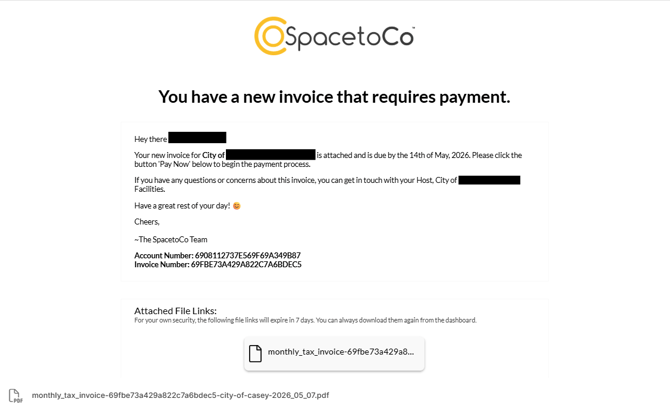
- Click the payment link
Click the payment link in your email or dashboard banner. - Pay using your Host's configured option
The payment option available depends on how your Host set up your account during application:
- Manual Card Payment: Enter your credit or debit card details to pay instantly via our payment gateway.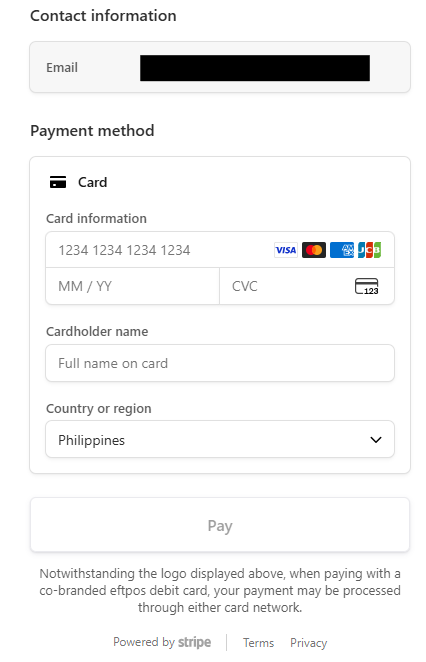
- Manual Bank Transfer: Follow the on-screen bank details to transfer funds directly from your bank account.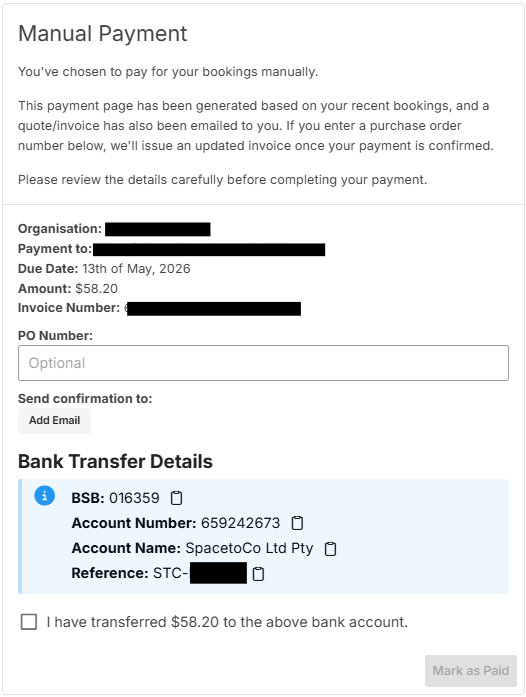
-
Complete the payment
Go to your Payments History tab and click on the "Pay now" button for the invoice you wish to pay. Once processed, SpacetoCo reconciles your payment and updates your invoice status to paid.
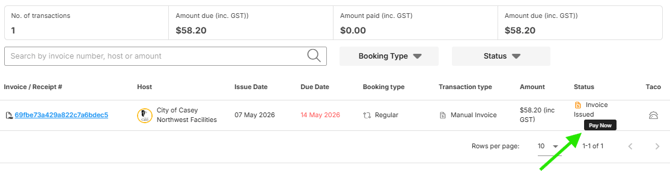
Note: Anyone in your organisation can pay the invoice using the link in the email notification without needing to log in to SpacetoCo.
Reminders and Overdue Invoices
If an invoice remains unpaid, SpacetoCo sends an email reminder every 7 days until payment is received. A banner also displays at the top of your dashboard while an invoice is outstanding.